Need OEM supplier support for this product type?
Contact KOLARWIN Tools for OEM mechanic tools, private label packaging, wholesale quotation and product range support. This gives overseas buyers a clear path from article reading to supplier discussion.
Use the amount of stock to remove and the finish required to narrow the choice. A rasp can shape a wooden contour quickly, while a suitable file can refine edges and dimensions. Profile, tooth form and material compatibility determine whether either tool reaches the surface without damaging it.
1. What is a hand file?
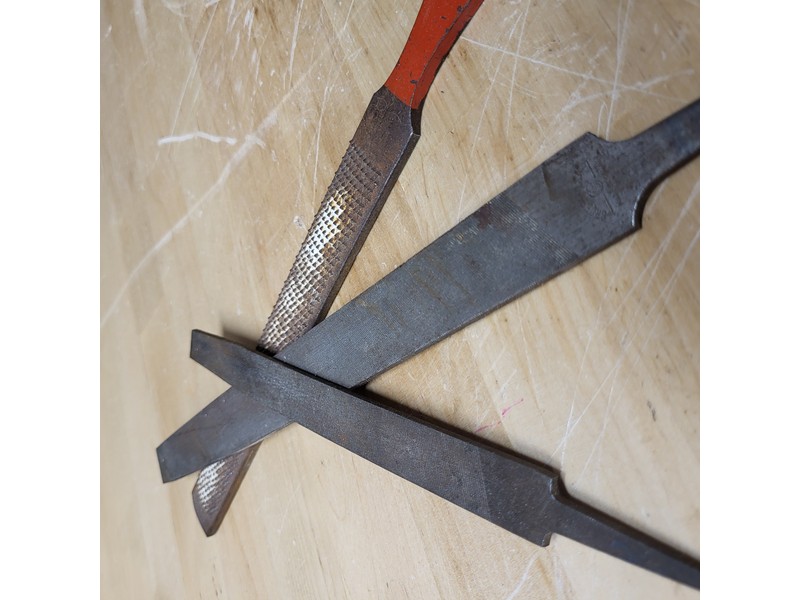
A hand file removes material through rows of teeth cut into a hardened steel surface. File shape, cut grade, and tooth pattern determine how it works on edges, flats, curves, and internal surfaces. Files support controlled shaping and finishing across metal, wood, and other materials when the specific tool is intended for that use. Use a handle where the tang design requires one. The hand file types guide gives the wider profile selection before choosing a particular cut.
- Identify the surface shape before selecting a file profile.
- Check that the handle is suitable for the supplied tang.
| Surface to work | Candidate file profile | Check |
|---|---|---|
| Flat edge | Flat file | Width and usable face |
| Internal curve | Round or half-round | Radius and access |
Start with contact area. Place the file gently against the profile to check reach before making a trial stroke.
2. What is a rasp?
A rasp has individually formed raised teeth that remove material more aggressively, commonly from wood or other relatively soft materials. Tooth size and spacing influence how quickly it removes stock and how rough the surface remains. Bahco’s half-round rasp data distinguishes coarse and medium cuts, illustrating that rasps also vary by shape and grade. Match rasp type to material and finish target. Choose woodworking clamps that keep the shaping area accessible.
- Inspect tooth spacing on the actual rasp rather than relying on a coarse label.
- Reserve enough material for the later finishing step.
| Shaping stage | Rasp candidate | Follow-up need |
|---|---|---|
| Large wood contour change | Coarse compatible rasp | Refine tooth marks |
| Approaching final contour | Finer compatible cut | Check dimension frequently |
Leave a finishing allowance. Mark the final contour clearly and stop rough shaping before the raised teeth reach it.
3. How do their teeth differ?
File teeth are generally arranged in regular rows or patterns, while rasp teeth are individual raised points. Exact arrangements vary by product. Rasp teeth tend to take larger bites in softer material; file cuts can support finer controlled work depending on grade. Do not assume every file is for metal or every rasp is for wood; read manufacturer application information. Compare bastard and smooth file grades when the choice concerns removal versus finish within a file family.
- Compare teeth in close-up images of both candidate tools.
- Check whether an edge is toothed when it will touch an adjoining face.
| Tooth arrangement | Selection implication | Watch for |
|---|---|---|
| Regular file-cut rows | Controlled filing matched to grade | Loaded teeth scratching the surface |
| Individual rasp teeth | Biting action on suitable material | Deep marks near final dimensions |
Inspect the working faces. Ask for photographs of both broad faces and edges when the job includes an internal corner.
4. When should a user choose a file?
Choose a file for controlled shaping, edge dressing, and surface refinement when its cut and material compatibility fit the task. Flat, half-round, round, and triangular forms reach different profiles. Start with a suitable grade and use even strokes without excessive pressure. A file card or cleaning method approved for the tool can help clear loaded teeth. For an edge left by sawing, review the preceding hacksaw operation if excessive burrs or a crooked cut keep recurring.
- Check the burr or excess stock before choosing the cut grade.
- Protect adjoining finished faces from unintended contact.
| Finishing job | File choice to investigate | Acceptance check |
|---|---|---|
| Dressing a straight cut edge | Flat file with suitable cut | Edge remains straight |
| Refining an internal opening | Round or half-round profile | Shape remains within the drawing |
Work toward a marked limit. Take a few controlled strokes, then recheck the dimension before removing more stock.
5. When is a rasp a better choice?
A rasp suits rapid stock removal or shaping on materials such as wood where a rougher initial surface can be refined later. Coarse rasps remove material faster than finer cuts but leave more texture. Use a half-round rasp for compatible flat and concave surfaces; profile selection still matters. Avoid using a rasp where its teeth can damage a finished face. A suitable hand saw can remove a large waste piece before the rasp starts shaping the remaining contour.
- Confirm the wood is held firmly without marking the finished area.
- Plan how coarse tooth marks will be removed after shaping.
| Woodworking stage | Tool role | Stopping point |
|---|---|---|
| Rough contouring | Compatible rasp removes excess | Before final contour line |
| Final surface preparation | Finer tool or abrasive | Required finish reached |
Separate shaping from finishing. Choose the second tool before starting so the rasp's scratches do not become an unexpected finishing job.
6. How do shape and cut grade affect selection?
Shape governs access and contact: flat files reach planes, round files reach holes, and half-round tools bridge flat and curved surfaces. Grade governs aggressiveness and finish. Manufacturers may use different naming conventions, so request the cut classification and dimensions. A clear brief names the workpiece profile and target finish instead of asking only for “a file.” Use calipers where the drawing calls for a dimensional check rather than judging the contour by eye.
- Match the profile radius to the smallest curve in the work.
- Compare grades within the same product family before comparing different brands.
| Selection axis | Example choices | Controls |
|---|---|---|
| Shape | Flat, round, half-round | Access and contour |
| Cut grade | Coarse, medium, fine as specified | Removal and texture |
Specify both dimensions of the choice. Write profile and cut grade as separate fields in the requisition.
7. What materials suit each tool?
Material suitability depends on tooth design, hardness, and intended use. Files are commonly available for metalworking and other applications; rasps often target wood shaping. Specialized products may serve plastics or other materials. Confirm maker guidance before use. Using a tool on an unsuitable material can load teeth, blunt edges, or produce poor surface quality. For burr removal without reshaping the whole face, consider whether a deburring tool fits the task.
- Identify the material and any hardened surface treatment.
- Stop if the teeth skate, clog repeatedly or gouge unpredictably.
| Material condition | Selection route | Avoid |
|---|---|---|
| Ordinary woodworking stock | Rasp or file rated for that material | Assuming every tooth grade leaves the same finish |
| Hardened or coated surface | Seek maker-approved tool guidance | Forcing an ordinary file |
Test on representative scrap. Keep the material description with the result so an accepted soft-stock trial is not extended to hardened parts.
8. How should users maintain files and rasps?
Keep teeth clean and protect tools from impact and corrosion. Use a file handle where required, and do not use a file as a pry bar or punch. Avoid stacking teeth against other tools. Inspect for clogged teeth, broken points, and loose handles. Retire tools that no longer cut predictably or have damage that risks workpiece or user injury. Review the hand filing technique alongside cleaning and storage instructions.
- Remove lodged material using the maker's approved cleaning method.
- Keep each toothed surface from rubbing against neighboring tools.
| Condition found | Action | Return to use |
|---|---|---|
| Teeth loaded with chips | Clean and inspect | When cutting is predictable |
| Loose handle or damaged tang | Repair or replace appropriately | Only after secure handling is restored |
Inspect before the next job. Add a quick tooth-and-handle check when returning files to storage.
9. What should buyers inspect in samples?
Check overall length, cut grade, tooth form, handle or tang finish, profile dimensions, and surface condition. Test a sample on the intended material with a consistent stroke and inspect removal rate and finish. The sample test informs selection but does not substitute for product specifications. Ask for drawings and clear labeling for coarse, medium, and finer grades.
- Use equal stroke counts on matching test coupons.
- Compare both stock removal and the cleanup required afterward.
| Sample result | Selection meaning | Decision |
|---|---|---|
| Fast removal with deep scratches | Useful for roughing | Allow a finishing stage |
| Slower cut with acceptable surface | Potential finishing choice | Check total job time |
Keep the test surfaces. Label each coupon with file code, grade and material so the approved result can be compared with later deliveries.
10. How should distributors describe the difference?
Describe a file as a toothed shaping and finishing tool, then state profile and cut grade. Describe a rasp by its raised-tooth form, intended material, and aggressiveness. Avoid generic claims such as “for all materials.”
- State the intended material beside each file or rasp name.
- Identify whether the listed length excludes the tang and whether a handle is included.
Make the listing distinguish the tools. Publish profile, cut grade, length convention and included handle instead of a single all-purpose shaping claim.
Frequently asked questions
Q1: How do rasp teeth differ from file teeth? Rasps use individually raised teeth; files generally use cut tooth rows or patterns.
Q2: Which removes material faster? A coarse rasp often removes stock rapidly from compatible softer material; verify the tool’s intended use.
Q3: Are all files meant for metal? No. Match the file to material and maker guidance.
Q4: What does coarse versus medium mean? It describes relative cut aggressiveness within the product family; consult its manufacturer data.
Q5: How can buyers evaluate a sample? Check profile, tooth form, cut grade, and finish on the target material.
For a quotation, contact our team with the selected configuration and sample acceptance requirements.
Looking for a reliable mechanic tools manufacturer in China?
If you are sourcing hand tools, socket tools, automotive repair tools, mechanic tool sets or OEM private label tools, contact KOLARWIN Tools for factory-direct quotation, customization support and product consultation.