Need OEM supplier support for this product type?
Contact KOLARWIN Tools for OEM mechanic tools, private label packaging, wholesale quotation and product range support. This gives overseas buyers a clear path from article reading to supplier discussion.
A hand file removes small amounts of material for fitting, deburring, shaping, or finishing. Buyers often see familiar shape names but different cut patterns, lengths, and grade labels across catalogs. This guide sorts those choices by workpiece profile, tooth style, stock, and purchasing use. Its recommendations rely on published manufacturer guidance; confirm dimensions and grade conventions against each supplier’s current drawing or catalog.
1. What jobs do hand files perform?
Hand files are manually guided cutting tools. Their teeth remove chips as an operator pushes the file across a workpiece, letting a fitter refine edges, smooth a cut surface, adjust a slot, or break a burr. A file can remove stock, but it does not replace a saw for separating material or a grinder for rapid bulk removal. It earns its place during controlled fitting, when a small correction can prevent a part from binding or leaving a sharp edge.
Maintenance buyers should start by identifying an operation, not a product name. A flat surface calls for broad, stable contact; a bore needs a curved profile; a narrow keyway needs a slim tool. A shop building a broader tool list can place files beside cutting and holding tools in an industrial maintenance tool assortment guide.
- Identify whether the job removes stock, fits a feature, or only breaks an edge.
- Record the workpiece shape and accessible approach angle.
- Set a finish or tolerance requirement before selecting a grade.
Match the surface before reading a shelf label. A practical opening purchase is one general flat profile plus a round or half-round option only where work includes holes or concave surfaces.
Job-to-tool checkpoint
| Work need | File direction | Buyer check |
|---|---|---|
| Flatten a cut edge | Flat or hand profile | Contact width and edge safety |
| Enlarge a round opening | Round profile | Diameter and taper |
| Reach a groove | Square, triangular, or warding profile | Groove width and corner angle |
| Shape wood or soft board | Rasp | Coarse or medium tooth style |
2. Which cross-section matches the workpiece geometry?
“Hand file” can describe a general category, while “flat file” and “mill file” identify particular patterns or applications. Catalog language varies, so compare the drawing and tooth pattern instead of assuming labels are interchangeable. Nicholson’s Swiss-pattern table describes a hand file as rectangular, tapered in width, and cut on two faces plus one edge, with the other edge safe or uncut. Other makers may organize pattern names differently. A mill file is commonly single-cut and used for sharpening or controlled finishing, but its geometry still depends on the maker’s pattern.
Profiles solve access problems. Flat and hand patterns work broad faces; square files enter rectangular holes and inside corners; round files enlarge holes or work radii. A half-round combines a flat face with a curved back, while a triangular file reaches acute internal angles. Warding files are thin for narrow slots. Nicholson’s file selection guide lists similar shape-based applications. Files are a finishing step after sawing or chiseling, not a substitute for those operations; see the site’s guides to hand saw types and chisel types for neighboring tool choices.
- Match the cross-section to the surface that must touch the teeth.
- Check whether edges are cut, safe, or tapered.
- Compare a catalog drawing before treating “hand” and “flat” as synonyms.
A shape name is only a starting point. Ask for a cross-section drawing when a profile must enter a defined slot or corner.
Profile selection checkpoint
| Profile | Typical contact area | Common job | Check before ordering |
|---|---|---|---|
| Flat / hand | Broad flat face | Flat surfaces, shoulders | Taper and safe-edge layout |
| Square | Four faces | Slots, rectangular holes | Width across flats |
| Round | Circumference | Holes, concave radii | Diameter and taper |
| Half-round | Flat face and curved face | Flat and concave work | Which faces carry teeth |
| Triangular | Three faces | Acute corners, V-grooves | Included angle and edge pattern |
| Warding | Thin flat section | Narrow slots and passages | Thickness and parallel faces |
3. How do single-cut, double-cut, and rasp teeth differ?
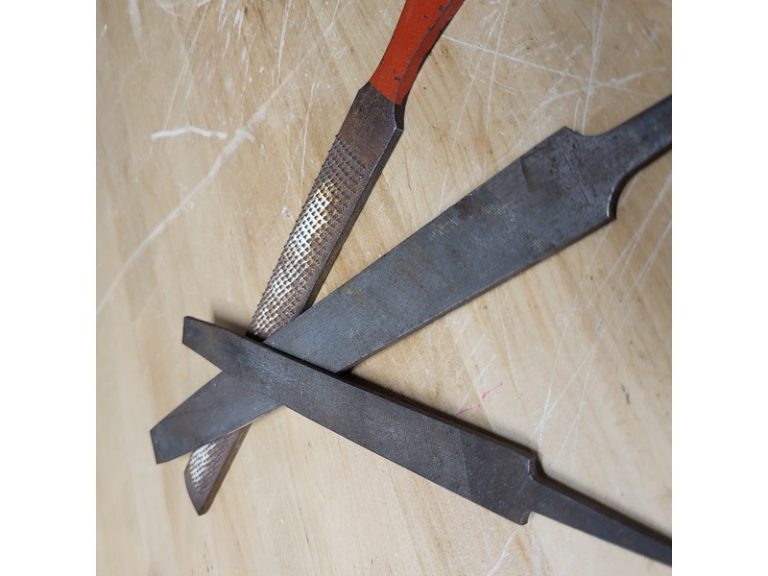
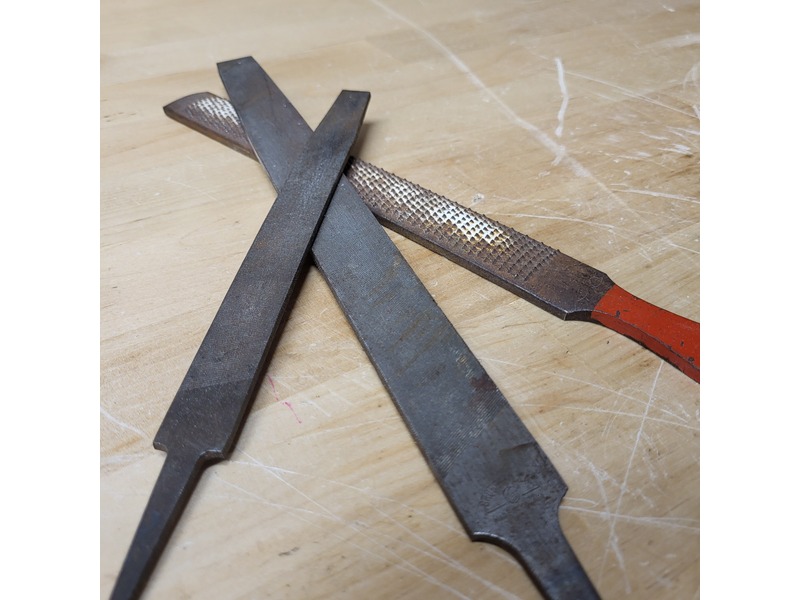
Cut describes how teeth are formed across a file face. A single-cut pattern has one series of diagonal teeth. A double-cut pattern crosses a second series over the first, creating smaller cutting points suited to general stock removal. Rasp teeth stand as separate raised points rather than continuous intersecting rows. These are different tooth forms, so “coarse” on a rasp should not be treated as the same specification as a coarse engineering-file grade.
Some patterns use a single-cut face with chip-breaking features. That still differs from a conventional double-cut pattern, even when catalogs describe both as single cut. Mill-tooth files also differ from cut-tooth files: their teeth are milled from the body and may have larger chip spaces. PFERD explains this construction in its file basics guide, while Bahco’s mill-file catalog identifies its faces and edges as single cut. Buyers should request tooth-pattern images or samples when the distinction affects finish or loading.
- Use double cut as a starting point for general hand filing.
- Consider single cut for controlled finishing or sharpening, subject to maker guidance.
- Specify rasp teeth for softer materials such as wood or wallboard.
A file’s tooth pattern controls its bite. Ask suppliers to identify tooth construction, face, and edge pattern separately.
Tooth-style checkpoint
| Tooth style | Visible pattern | Typical use | RFQ detail |
|---|---|---|---|
| Single cut | One diagonal row direction | Sharpening or controlled finishing | Angle, cut grade, face layout |
| Double cut | Crossing rows | General stock removal | Both cut directions and edges |
| Rasp | Individual raised teeth | Wood and other soft material | Coarse/medium definition and surface |
| Milled tooth | Formed teeth with open flutes | Selected softer-metal work | Tooth form and material application |
4. What do bastard, second, smooth, and grade labels mean?
Bastard, second, and smooth are common American-pattern coarseness names, with bastard generally coarser than second and smooth. Their exact tooth counts are not universal across lengths, profiles, and makers. Some manufacturers use numbered cut grades; others publish teeth per unit length or separate names for rasps and specialty files. A “second cut” from one series therefore cannot be assumed to equal a particular grit number from another supplier.
Length also changes tooth spacing. PFERD counts scores per centimeter along file length; its examples show different counts for short and long files sharing a cut designation. Bahco likewise publishes length-specific teeth-per-centimeter values in its round-file series. These examples show why a grade name alone cannot guarantee a matching finish. Request a maker’s table, then compare profiles at matching working lengths and materials before approving a substitute.
- Treat a grade name as maker-specific unless a standard is named and verified.
- Compare tooth count only when the counting method and length match.
- Approve a sample finish on representative stock before a large order.
Labels need a reference point. Record a maker’s grade chart or part number with each approved sample.
Grade comparison checkpoint
| Catalog term | Common relative meaning | Safe comparison method |
|---|---|---|
| Bastard | Coarser in many American-pattern ranges | Verify maker chart and file length |
| Second | Intermediate in many ranges | Compare listed tooth count and profile |
| Smooth | Finer in many ranges | Approve finish on target material |
| Numbered cut | Maker-defined series | Request the series legend |
| Coarse/medium rasp | Rasp-specific grades | Do not equate directly with file cuts |
5. How should file length be chosen?
File length affects reach, control, contact, and the space available for a working stroke. A longer blade can bridge a broader surface and reach deeper into a part, but it also needs more clearance. A shorter file can work in tighter spaces and may suit small components, though teeth on shorter files may be more closely spaced than those on a longer file carrying the same grade label. Do not infer a finish from length alone.
Measure the working surface and available stroke. Include fixture height, adjacent walls, and whether the operator needs room for a two-handed grip. Also distinguish blade length from assembled length; catalogs may report the toothed blade while packaged dimensions include handle. For repetitive shop use, test the loaded tool in its vise or fixture instead of choosing by nominal length alone.
- Measure the usable surface and clearance for a forward stroke.
- Confirm whether the listed length means blade or assembled length.
- Match length and profile when comparing grade tables or samples.
Length is part of the cutting specification. Test the proposed size against your widest and tightest workpieces.
Length checkpoint
| Work condition | Selection direction | Verify |
|---|---|---|
| Broad face | Longer blade may span more surface | Clearance and flatness control |
| Small component | Shorter blade may improve access | Tooth spacing and grip |
| Deep recess | Longer reach or a slim profile | Reach without striking adjacent walls |
| Mixed jobs | Two lengths may cover distinct needs | Whether overlap adds useful capacity |
6. How should stock material and removal rate guide the choice?
Material changes the cutting response. A tooth pattern that works well on steel may load up or feel too aggressive on softer stock. PFERD describes milled teeth with open flutes as a way to contain chips, and Bahco lists mill files for sharpening and selected finishing work. Those maker examples are application-specific; they do not establish a universal “aluminum file” rule for every alloy or finish requirement.
Before buying, note the workpiece material and condition: mild or alloy steel, nonferrous metal, plastic, wood, or composite. Then record whether the operator needs fast removal, controlled fitting, or a finish that will receive another process. Surface coating, hardness, burr size, and chip clearance can all change the trial result. Where holding is part of the task, choose a suitable vise or clamp and review safe workholding options before asking operators to stabilize stock by hand.
- Identify material and any coating or heat-treated surface.
- Define whether the file removes stock, blends an edge, or prepares a finish.
- Trial cut, chip behavior, and surface quality on the actual material.
Let workpiece results decide. Run a controlled sample test when material or finish requirements differ from your existing range.
Material and removal checkpoint
| Stock / target | Starting consideration | Sample-test focus |
|---|---|---|
| Steel fitting | Engineering file pattern and specified grade | Bite, chip form, finish |
| Soft nonferrous metal | Open chip spaces may help in selected patterns | Loading and surface marks |
| Wood or board | Rasp profile | Removal rate and tear-out |
| Plastic or composite | Maker-approved tooth geometry | Heat, clogging, edge quality |
| Fine fit | Finer maker grade and controlled pressure | Dimensional change per stroke |
7. When should a buyer choose a mill file instead of a flat file?
“Mill file” commonly points to a single-cut file used for sharpening and selected finishing, while “flat file” often names a broader general-purpose double-cut pattern. Yet catalogs do not apply these names identically. Bahco’s published mill-file range has single-cut faces and edges and includes sharpening uses; its flat-file listing describes double-cut faces with a single-cut edge. Nicholson’s selection guide separately recommends shape and coarseness based on stock removal and finish. Treat each catalog entry as its own specification.
Use a mill file when its tooth pattern and shape match the specified sharpening or finishing operation. Choose a flat file for broad general filing only after confirming whether its taper and edge cuts suit the part. After filing to a specified dimension, inspect the part with suitable measuring equipment. Compare digital and dial calipers when choosing a general dimensional inspection tool.
- Compare face and edge cuts, not just the product name.
- Check whether the file is intended for sharpening, fitting, or both.
- Confirm the tool’s geometry against the part or blade drawing.
Choose by specification, then by name. For substitutions, record the approved pattern and exact maker part number.
Mill-versus-flat checkpoint
| Attribute | Mill-file pattern | Flat-file pattern |
|---|---|---|
| Common tooth style | Often single cut | Often double-cut face with edge variation |
| Common role | Sharpening and selected finishing | General flat filing and stock removal |
| Name consistency | Varies by maker | Varies by maker |
| Approval evidence | Cut, shape, length, use | Cut, taper, safe-edge layout |
8. How do tangs and handles affect safe use?
Many engineering files have a pointed tang intended for a separate handle; some products arrive handled, and some compact files have an integral grip. Fit a compatible handle before using a file with a pointed tang; never grip the bare tang. Nicholson’s guide describes holding a two-handed file by its handle and supporting the point with your other hand. That method is maker guidance for the listed file style, not approval for an improvised handle.
Specify handled or unhandled supply, handle material, fit, and whether the buyer needs a separate handle in each package. Match handle size to expected use and local safety procedures. OSHA’s construction hand-tool rule prohibits unsafe tools within its scope; its small-business safety handbook checklist also calls for appropriate handles on files and similar tools. Staff should inspect fit and condition, secure work in a vise, and use eye protection where filing can send chips toward the face.
- Confirm the tang dimensions and compatible handle before ordering unhandled files.
- Reject a loose, cracked, or improvised handle.
- Secure the work and follow site PPE rules for flying particles.
Handle fit belongs in the order line. Request handle part number and an assembled sample when shipping as a set.
Handle checkpoint
| Supply format | Buyer requirement | Inspection point |
|---|---|---|
| Handled file | Handle material and assembled length | No looseness, cracks, or sharp defects |
| Unhandled file | Tang dimensions and compatible handle | Tang fully seated in correct handle |
| File-and-handle set | Quantity and matching part numbers | Fit checked as an assembled unit |
| Precision or one-hand file | Intended grip and workpiece scale | Controlled access without hand near cutting path |
9. How should teams use, clean, inspect, and store files?
For conventional hand filing, clamp work where practical, then guide a controlled forward stroke. Nicholson’s technique notes advise using enough pressure to cut and easing pressure on the return stroke; excessive force can chip or clog teeth. Its guide also cautions that a rocking stroke can round a flat surface. OSHA’s construction hand-tool rule prohibits employers from issuing unsafe hand tools within that standard’s scope. Follow the site’s risk assessment and current product instructions as well.
Keep files from knocking against one another in storage, since damaged teeth cannot cut consistently. Clear packed chips with a file card suited to each tooth form; avoid methods that damage teeth or create a hand hazard. Inspect for worn teeth, cracks, a loose handle, corrosion, or contamination before use. A fixture keeps both hands on a file; see our clamp types when a vise cannot secure your workpiece.
- Inspect tool and handle before each job.
- Use steady pressure on the cutting stroke and a light return.
- Clean and store files so teeth do not strike other tools.
A worn file can ruin a good fit. Remove damaged tools from service and replace them under your maintenance procedure.
Care checkpoint
| Practice | Purpose | Buyer or supervisor check |
|---|---|---|
| Secure the workpiece | Frees both hands for control | Vise or fixture suits part geometry |
| Controlled forward stroke | Limits chatter and uneven removal | Operator avoids rocking on flat faces |
| Clean teeth carefully | Reduces chip packing | Cleaner suits cut pattern |
| Inspect handle and blade | Finds defects before use | Loose handle, cracks, corrosion, wear |
| Separate storage | Protects cutting edges | Teeth do not rub against neighboring files |
10. What should procurement specify in an assortment or RFQ?
A useful range covers repeated jobs without turning every profile into a slow-moving SKU. Start with work orders, common part drawings, and maintenance feedback. Build a trial set by geometry and material, then add finer or specialty patterns only where operators can explain the need. Buyers planning broader shop coverage can compare the file mix with a mechanic tool list and a distributor tool-kit buying guide.
Put these fields on an RFQ:
- File pattern, cross-section drawing, blade length, and total length.
- Tooth form, cut designation, grade legend, teeth-per-length method, and safe-edge layout.
- Intended material, operation, finish target, and sample-approval method.
- Tang size, handle format, packaging, material marking, and requested documents.
- Part number, requested substitutions, carton quantity, and inspection criteria.
A clean RFQ prevents catalog guesswork. Share a representative part drawing or sample, then request a sample file and document its pattern before confirming a range. For a sourcing inquiry, send the specification through KOLARWIN’s contact page; do not assume an unlisted profile, quantity, or capability is available.
A useful starting assortment covers recurring shapes, materials, and finish levels with few SKUs. Confirm names against drawings, compare samples on real stock, and keep the approved maker code with each order. That record gives engineering, purchasing, and receiving one shared reference when a future substitution comes up.
Q1: What are the main types of hand files?
Common profiles include flat or hand, square, round, half-round, triangular, and warding files. Mill files and rasps describe distinct patterns or applications, with naming varying by manufacturer.
Q2: What is the difference between a single-cut and double-cut file?
A single-cut file has one diagonal tooth series. A double-cut file has crossing series, producing a different cutting pattern. Compare maker specifications for the intended material and finish.
Q3: Is a mill file the same as a flat file?
Not necessarily. Mill file often names a single-cut sharpening or finishing pattern, while flat file can refer to a general flat profile. Confirm tooth layout and dimensions in the maker’s catalog.
Q4: What does bastard cut mean?
Bastard commonly identifies a coarser grade within some American-pattern file ranges. It is not a universal grit number; confirm the maker’s grade chart, profile, and length.
Q5: Can I use a file without a handle?
Use a file with its intended handle configuration. A pointed tang should fit a compatible handle; do not grip a bare tang by hand. Follow the tool maker’s and workplace safety guidance.
Looking for a reliable mechanic tools manufacturer in China?
If you are sourcing hand tools, socket tools, automotive repair tools, mechanic tool sets or OEM private label tools, contact KOLARWIN Tools for factory-direct quotation, customization support and product consultation.