Need OEM supplier support for this product type?
Contact KOLARWIN Tools for OEM mechanic tools, private label packaging, wholesale quotation and product range support. This gives overseas buyers a clear path from article reading to supplier discussion.
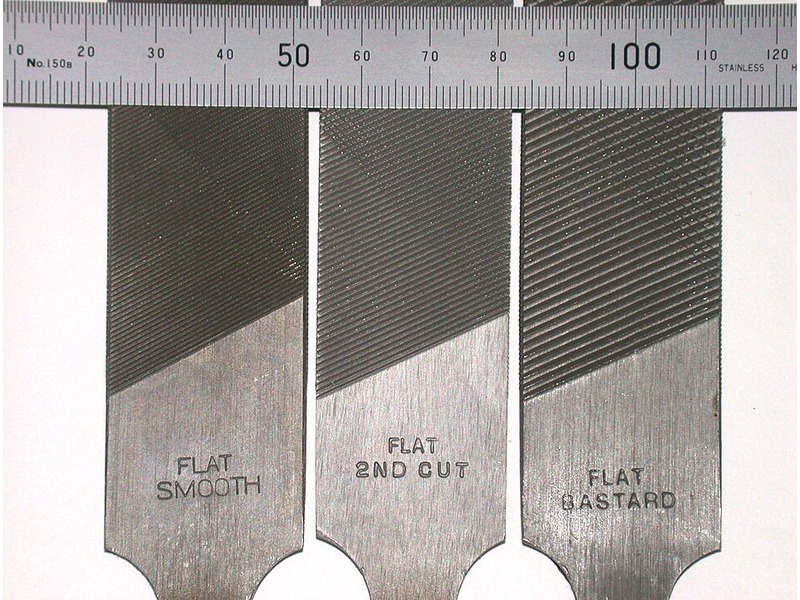
A bastard file generally offers a coarser cut than a smooth file within a comparable product family and length. That distinction helps separate stock removal from finishing, but a grade name alone cannot specify a file. For buyers, the useful comparison includes tooth pattern, length, work material and the finish required. Manufacturer terminology and labeled examples below show how to turn that comparison into an order.
1. What does bastard file versus smooth file mean?
Bastard and smooth describe coarseness grades. They do not identify the file’s shape, handle design or material application. A request for “smooth files” could still produce several different tools. Specify the complete tool before comparing grades, especially when quotes arrive from suppliers using different catalog systems.
The Crescent Nicholson filing guide distinguishes bastard, second-cut and smooth grades. It associates coarser double-cut files with stock removal and finer options with finishing, subject to the job. This comparison concerns those grade choices. Our hand file types guide covers shapes and tooth arrangements more broadly.
Start with matching tools. Compare files of the same profile, length and tooth pattern before deciding which grade suits a purchasing line. Otherwise, several variables change at once and the result tells you little about grade alone.
- Name the file profile.
- Record its nominal length and tooth pattern.
- Compare grades within that defined family.
What each label answers
| Label | Main meaning | Still needs confirmation |
|---|---|---|
| Bastard | Relatively coarser grade | Length, pattern and intended material |
| Second-cut | Intermediate grade in the named system | Exact model and tooth specification |
| Smooth | Relatively finer grade | Required finish and application |
2. Is a bastard file always double-cut?
Coarseness and tooth arrangement are separate specifications. Single-cut describes one set of diagonal tooth rows; double-cut describes crossing rows. Either description needs a grade and product reference. A smooth-grade file does not automatically have single-cut teeth, and a bastard label should not substitute for a drawing or catalog entry.
PFERD’s explanation of file construction separates cut arrangements and tooth density. This is why a quotation should carry both fields. When samples arrive, compare the actual cutting faces with the description instead of relying on handle color or the distributor’s short product name.
For a mixed workshop assortment, confusing these terms can create duplicate finishing tools while leaving a stock-removal requirement uncovered. A purchasing spreadsheet should let reviewers sort by pattern and grade independently. That also makes substitutions easier to assess when a supplier proposes another model.
Keep two columns in the quote. One column should identify tooth arrangement and another should identify coarseness.
- Ask for a clear cutting-face photograph.
- Record both face and edge arrangements.
- Resolve mismatches before approving the sample.
Pattern and grade checks
| Specification | Example of a useful entry | Avoid |
|---|---|---|
| Face pattern | Double-cut | Assuming it from “bastard” |
| Grade | Smooth, with model code | Assuming it from “single-cut” |
| Edge condition | Cut or uncut, as specified | Treating every edge as identical |
3. Why does file length change the comparison?
A grade is not a universal tooth-density number across every length. PFERD notes that tooth counts vary with file length. Consequently, buying a longer file with the same grade name may change its tooth spacing as well as its reach and working area. Keep length fixed when investigating a grade-related problem.
A specific manufacturer example makes this visible. Bahco’s 1-230 round-file series lists different teeth-per-centimeter values for its 150 mm and 200 mm versions. These figures belong to that series; they are not a conversion chart for flat files or another maker’s products.
Compare the complete catalog row. A short description such as “8-inch smooth” omits profile, pattern and sometimes the convention used for length. Confirm whether a quoted dimension refers to the working file length or an overall assembly with handle.
- Hold length constant during grade trials.
- Preserve the supplier’s measurement labels.
- Treat cross-brand equivalence as something to verify.
Named manufacturer example
| Bahco model | Listed length | Listed grade | Listed teeth/cm |
|---|---|---|---|
| 1-230-06-1-2 | 150 mm | Bastard | 12 |
| 1-230-06-3-2 | 150 mm | Smooth | 24 |
| 1-230-08-1-2 | 200 mm | Bastard | 10 |
| 1-230-08-3-2 | 200 mm | Smooth | 21 |
4. When should buyers consider a bastard file?
Consider a coarser grade when the job includes a defined amount of stock removal before final finishing. The workpiece must suit the selected file, and the removal allowance must permit that approach. “Bastard” does not authorize filing any metal, hardened part or coated surface encountered on a bench.
For example, a shop preparing a sawn bracket might separate saw-cut cleanup from its final dimensional check. The starting surface, remaining allowance and accessible area all affect the trial. Our hacksaw use guide covers the upstream cutting operation. Filing cannot compensate for an incorrectly located cut without changing the finished part.
Define the removal allowance before choosing a coarse grade. Ask the process owner how much material can be removed and which surfaces must remain untouched. This prevents a purchasing decision from becoming an undocumented process change.
- Identify the work material and condition.
- Mark protected surfaces and dimensional limits.
- Trial the proposed model on an approved representative sample.
Stock-removal questions
| Question | Why buyers need an answer | Record |
|---|---|---|
| What material is present? | Suitability varies by file | Material and condition |
| How much may be removed? | Excess removal can scrap a part | Drawing allowance |
| What follows filing? | Finishing may need another grade | Next operation |
5. When is a smooth file the more useful choice?
A smooth-grade file is a candidate when controlled finishing matters more than rapid removal. It still removes material. The word “smooth” does not promise a polished surface, a particular roughness value or freedom from scratches. The actual outcome depends on the file, work material, condition and approved technique.
Decide what acceptance means before comparing samples. A mating surface may need dimensional and geometric checks, while a noncritical exposed edge may have a different finishing requirement. Do not replace a drawing requirement with a statement that a surface “feels fine.” Choose the inspection method with the person responsible for the part.
The digital versus dial caliper guide addresses dimensional measurement choices. A caliper does not verify every aspect of flatness or surface texture. Those characteristics need their own appropriate checks where specified.
Write the finish requirement in observable terms. If a numerical surface requirement exists, retain it and its measurement method rather than translating it into a file grade.
- Separate size, geometry and surface requirements.
- Inspect after controlled intervals.
- Stop before crossing a specified limit.
Finishing acceptance
| Requirement | Useful evidence | Insufficient evidence |
|---|---|---|
| Final dimension | Approved measurement | Grade name alone |
| Surface condition | Defined visual or measured criterion | “Looks smooth” without a reference |
| Edge condition | Drawing or agreed sample | Repeated filing until it feels different |
6. Should a workshop stock both grades?
Stock both when separate operations justify them. A two-stage process may use one file for removal and another for finishing, but that sequence is not compulsory for every job. Some tasks need only a small correction. Others require a different tool or process altogether.
For distributors, useful assortment planning begins with customer tasks. Ask whether the buyer supplies repair benches, production finishing stations or general maintenance kits. A set containing multiple grades can be practical, provided each component has a defined purpose and clear identification. Adding near-duplicate files merely to raise piece count makes replenishment harder.
Use an industrial maintenance tool plan to separate commonly replenished tools from occasional specialist items. Keep grade choices visible in the bill of materials so replacement orders preserve the original assortment.
Assign a job to every file in the set. Record why it belongs and what would trigger replacement or a different grade.
- List removal and finishing tasks separately.
- Match the assortment with actual work materials.
- Keep replacement model references beside each item.
Assortment planning
| Workshop need | Possible purchasing response | Check before ordering |
|---|---|---|
| Repeated removal and finishing | Two documented grades | Each stage has an acceptance point |
| Occasional small correction | A narrower assortment | Selected file covers the actual task |
| Mixed work materials | Material-specific choices | No unsupported universal file claim |
7. Why can a smooth file still leave deep scratches?
A grade label cannot diagnose a scratch on its own. Inspect the cutting face, work surface and support arrangement before changing grades. Embedded chips, damaged teeth, loose work or inconsistent contact can undermine an otherwise reasonable selection. Record the observed problem rather than assuming the supplier sent an excessively coarse file.
Nicholson calls filings trapped between teeth “pinning.” Its guide discusses cleaning and pressure as parts of file care. Follow the selected maker’s cleaning instructions and use suitable cleaning equipment. Do not try to clear a loaded file by sweeping a bare hand across its teeth.
The workpiece also needs stable support. Our clamp types guide helps identify workholding families, but a particular fixture must suit the component and operation. A clamp’s general name does not establish adequate support.
Inspect the setup before blaming the grade. Keep a short record of material, file identity and the defect location so a sample review can be repeated.
- Check the file and handle before use.
- Clear chips using the maker’s approved method.
- Stop if the workpiece moves or the file is damaged.
Troubleshooting record
| Observation | Check | Purchasing implication |
|---|---|---|
| Isolated deep groove | Loaded or damaged cutting face | Inspect condition before replacing grade |
| Uneven surface | Support and contact consistency | Review fixture and work instruction |
| Unexpected removal | Model, grade and length | Confirm the supplied item matches approval |
8. How should buyers compare supplier samples?
Compare samples under the same documented conditions. Use representative stock with the same material condition, starting surface and removal allowance. Changing material, file length and grade together makes the comparison difficult to interpret. Have a qualified operator follow the approved work instruction rather than inventing a force target for the trial.
A useful sample review records the product code, handle arrangement, cutting-face condition and resulting part. Photographs can document visible differences, while suitable measurements address specified dimensions. If service life matters, agree on a repeatable evaluation before asking suppliers for a lifetime claim. A brief trial cannot establish production life across all applications.
Our mechanic tool-set buying guide discusses assortment decisions. Keep a file comparison narrower: evaluate the component against its task rather than scoring the whole kit on appearance.
Change one selection variable at a time. Use the same inspection criteria for every sample and retain the accepted reference.
- Record file family, length, pattern and grade.
- Use comparable workpieces and instructions.
- Document acceptance and unresolved differences.
Sample-review sheet
| Item | Record for each sample | Decision supported |
|---|---|---|
| Identity | Maker, code and grade | Traceability |
| Test setup | Material, support and work instruction | Fair comparison |
| Result | Required dimensions and surface checks | Application fit |
| Disposition | Accept, reject or retest | Controlled purchasing decision |
9. What belongs in a bastard or smooth file RFQ?
An effective request identifies more than grade. Include profile, file length, tooth arrangement, edge details, handle requirement and intended material. Attach a drawing or approved sample when geometry matters. State whether the order covers individual replacement files or a defined assortment.
Ask suppliers to identify substitutions explicitly. A smooth file from another family may have a different tooth count, cross-section or reach. A different handle may also affect storage, grip clearance and packaging. Evaluate those differences before accepting a substitute as equivalent.
Keep cutting and finishing tools separate in the inquiry. A cold-chisel versus wood-chisel comparison illustrates another material-specific tool decision. A file should not be used as a struck chisel or pry tool because its shape happens to fit a gap.
Request confirmation against a complete line item. Packaging, quantity, inspection records and commercial terms should be agreed for the actual quotation.
- Specify the complete file, not only its grade.
- Describe the intended work material and finish.
- Ask suppliers to list every proposed deviation.
RFQ fields
| Field | Buyer supplies | Supplier confirms |
|---|---|---|
| Tool description | Profile, length, pattern and grade | Matching model or stated alternative |
| Application | Material, geometry and finish requirement | Documented suitability limits |
| Handle and packaging | Required configuration and quantities | Available quoted arrangement |
| Inspection | Drawing or approved reference | Agreed evidence and acceptance method |
10. How do you make the final grade choice?
Choose a bastard or smooth file by the actual operation, then verify the complete tool. A coarser grade may suit an approved stock-removal stage; a finer grade may suit finishing. Neither name replaces material compatibility, stable workholding or inspection. Keep the chosen model and its sample record together so the next order can be checked consistently.
For operating technique, use the separate hand-file use guide. For a quotation, send KOLARWIN your material, file profile and length, desired grade, handle arrangement and quantities through our inquiry page. Include the finish requirement or an approved reference where available. The proposed supply configuration and commercial terms can then be confirmed against that request.
Send the specification that your workshop can verify. A complete description gives both buyer and supplier a practical basis for reviewing samples and substitutions.
- Identify the job and its acceptance limits.
- Confirm the full model specification.
- Approve the sample before treating alternatives as equivalent.
Q1: Is a bastard file the same as a coarse file?
Bastard is a named coarseness grade. Some catalog systems distinguish it from a separate coarse grade. Use the manufacturer’s terminology and model specification.
Q2: Does smooth mean single-cut?
No. Smooth describes grade, while single-cut describes tooth arrangement. Specify both fields.
Q3: Can I compare grades across different lengths?
You can compare complete products, but the grade name alone is insufficient. Tooth density may change with length even within one product family.
Q4: Will a smooth file meet a specified surface roughness?
That cannot be guaranteed from the label. Verify the selected tool and process against the actual surface requirement.
Q5: Should an importer buy both bastard and smooth grades?
Only when customer tasks justify both. Define each component’s role, replacement reference and acceptance criteria before finalizing the assortment.
Looking for a reliable mechanic tools manufacturer in China?
If you are sourcing hand tools, socket tools, automotive repair tools, mechanic tool sets or OEM private label tools, contact KOLARWIN Tools for factory-direct quotation, customization support and product consultation.