Need OEM supplier support for this product type?
Contact KOLARWIN Tools for OEM mechanic tools, private label packaging, wholesale quotation and product range support. This gives overseas buyers a clear path from article reading to supplier discussion.
A custom socket set needs a defined job, a complete bill of materials, and storage that keeps every component usable. Set drive sizes, fastener coverage, access requirements, and hand or impact use before requesting quotes. Then approve the tool list, case layout, markings, and sample against one controlled revision.
Contents
- 1. What should a custom socket set solve for its end user?
- 2. How should a buyer define the BOM and size coverage?
- 3. Which tool types belong in the set, and which need separate variants?
- 4. How can size coverage stay useful without becoming an oversized kit?
- 5. What should a custom case, tray, or rail layout accomplish?
- 6. How should branding and private-label marking be specified?
- 7. What should a prototype or pre-production sample prove?
- 8. How should OEM design support and ownership questions be handled?
- 9. How can change control protect repeat orders?
- 10. What should a buyer include in the final custom socket set RFQ?
1. What should a custom socket set solve for its end user?
Start with a workbench, service bay, or retail shelf. Define where users will open the kit. Build around a repeatable job for a named user. Record buyer, user, common fasteners, access limits, and whether tools travel. A repair-shop distributor may need service coverage and replenishment. Retail buyers may prioritize clear labels and compact storage.
Useful inputs include:
- Buyer channel and end user
- Applications and common fasteners
- Hand or powered use, stated separately
- Portability, storage, and replenishment needs
A precise use case lets each component earn its place. Name specific jobs, access limits, and buyer objections. Ask intended users or sales staff to flag missing tools before the BOM is frozen.
Write a one-page use-case brief before selecting sizes or requesting a case concept.
Translate applications into a buyer brief
| Brief field | What to record | Why it affects the set |
|---|---|---|
| User and channel | Technician, team, distributor, retail | Guides packaging and assortment |
| Typical jobs | Named service tasks | Links parts with real work |
| Work conditions | Bench, vehicle, site, tool room | Guides storage choices |
| Product boundary | Hand, powered, or separate variants | Prevents incompatible grouping |
2. How should a buyer define the BOM and size coverage?
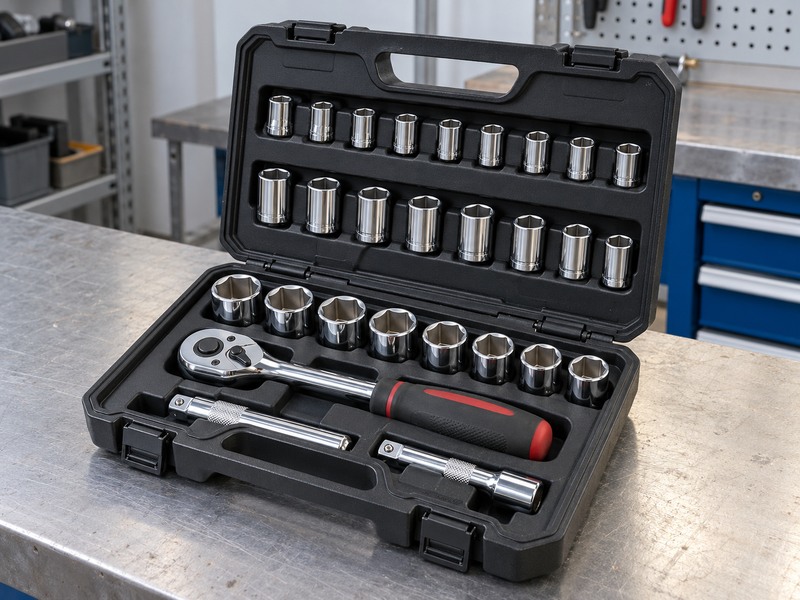
Build the bill of materials (BOM) from fastener coverage. State units, size range, quantity, depth, point configuration, drive size, and accessory count. Record square-drive connection separately from fastener opening. Use the drive size guide and socket tools overview to align terms.
- List each size on its own BOM line.
- State metric or inch units, and keep square-drive size separate from socket opening. Fractional inch sizes remain valid.
- Specify depth and point profile per item.
- Reconcile BOM quantity with total count and package layout.
Each item number should match across the BOM, tray, label, and sample checklist. The six-point versus twelve-point comparison clarifies profile choices. The deep versus shallow socket guide explains depth choices.
Issue a controlled BOM with units, quantity, drive, depth, profile, and reference per line.
BOM fields worth locking
| BOM field | Example format | Buyer check |
|---|---|---|
| Size system | Metric or inch, stated per line | No unexplained mixed notation |
| Socket opening | Individual size and quantity | Coverage tied to target applications |
| Drive connection | Square-drive size per item | Compatible with listed ratchet or accessory |
| Depth and profile | Shallow/deep; six/twelve point | Choices documented item by item |
| Set count | Reconciled total pieces | Reconcile BOM, tray, carton, and listing |
3. Which tool types belong in the set, and which need separate variants?
Choose tools by task and host tool. Hand and impact sockets are distinct. For powered use, specify socket type, connection, and any retention or accessory requirement. The impact sockets versus regular sockets guide explains basic boundaries. A mixed-drive impact set is one specific configuration, not a default.
Give each accessory a job. Check connections and whether mixed use needs separate SKUs.
- Name each accessory by job and connection.
- List hand-use and powered-use variants separately.
Set contents should tell users which tool fits each task. Do not infer ratings or standards from appearance or finish.
Mark each BOM line as hand-use, powered-use, or accessory, then resolve uncertain pairings before sample approval.
Separate product roles
| Item group | Buyer question | Specification control |
|---|---|---|
| Hand sockets | Which manual tasks and drive tools are intended? | List size, profile, depth, and square drive |
| Impact sockets | Is powered use part of this SKU? | State intended use and exact item family |
| Extensions and joints | What access problem does each solve? | List connection and length per line |
| Adapters | Which input and output connections are required? | Specify both ends and intended pairing |
| Bit sockets | Which bit profiles belong in this range? | Name profile and interface separately |
4. How can size coverage stay useful without becoming an oversized kit?
A useful assortment covers common work and stays easy to explain. Extra pieces can increase cost, package volume, and replenishment complexity; gaps can frustrate users. Check sizes against application records, sales feedback, and local conventions. Separate core items from additions. If evidence is incomplete, plan a post-launch review.
- Rank sizes as core, secondary, or optional.
- Check which sizes serve multiple target jobs.
- Record why low-frequency components remain.
- Consider a base SKU with add-ons for varied coverage needs.
SKU planning drives assortment tradeoffs. A broad kit may simplify a catalogue but burden buyers who need core coverage. Smaller kits may fit better but add item codes and forecasting work. Compare against channel ordering habits.
Ask sales and service teams to rank sizes and explain borderline additions.
Coverage and assortment choices
| Assortment approach | Works when | Watch for |
|---|---|---|
| Core kit | Most users share a common task set | Unusual jobs may need add-ons |
| Expanded kit | Buyers value one-box coverage | Larger case and slower-moving components |
| Base plus add-ons | User needs vary by channel or task | More SKUs and forecast coordination |
| Separate application kits | Jobs differ materially | Clear naming and range architecture required |
5. What should a custom case, tray, or rail layout accomplish?
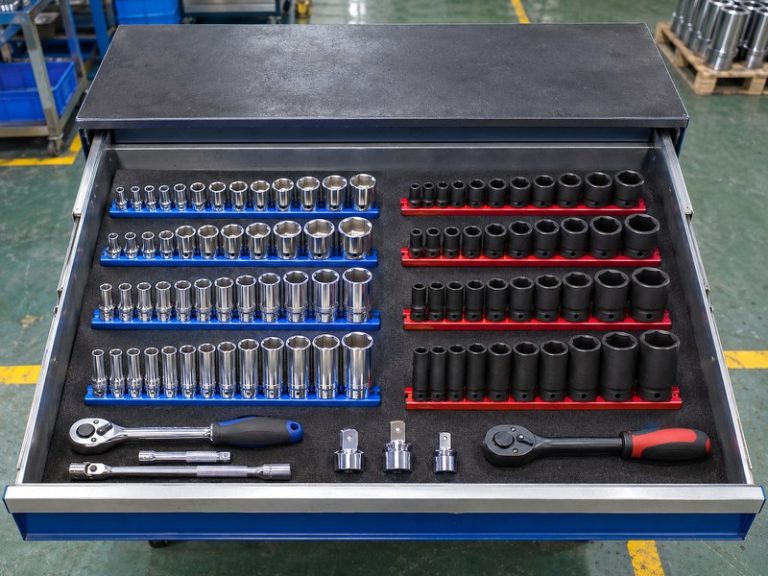
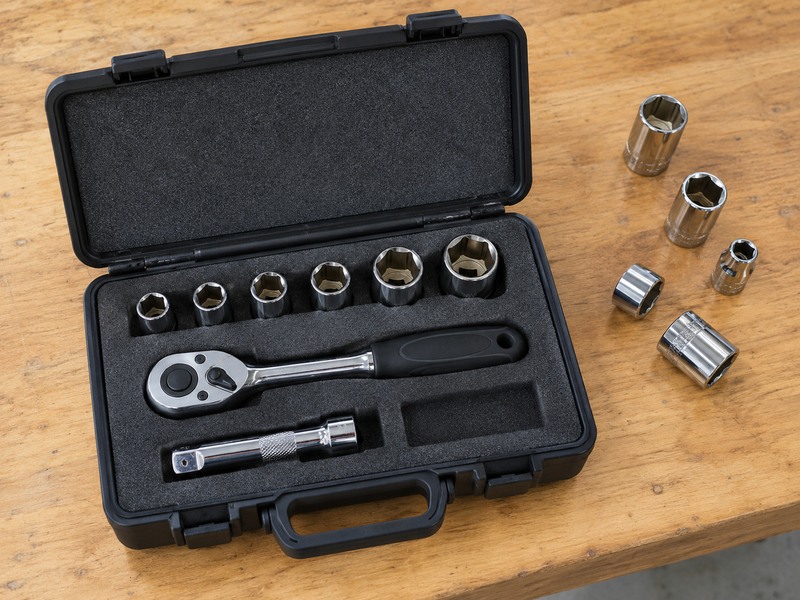
Storage design affects identification, access, and replenishment. Choose a case, tray, foam insert, or rail for the work area and sales channel. For a custom case, specify dimensions, orientation, material expectations, latch, handle, label zones, and shelf or drawer limits. Keep these as requirements for quotation and sample review.
Tie each cavity to a BOM number. Check stored-size visibility, movement, protrusion, and blocked items. Define use when open, closed, carried, or stored.
Review the layout for:
- Visible size and item identifiers
- A clear return position for each tool
- Replacement identification for reorders
A tray earns its space when users can spot missing tools quickly. Compare its open layout with a real replenishment task. Ask a reviewer unfamiliar with the design to return each piece after use. Capture confusion and retention concerns in writing.
Request a dimensioned layout tied to the BOM and review it with representative users before sample approval.
Storage brief and review criteria
| Design choice | State in the brief | Sample review question |
|---|---|---|
| Format | Case, tray, foam, rail, or other | Does it suit the work area and channel? |
| Identification | Size, item number, or label placement | Can users find and return each tool? |
| Retention | Requested holder or cavity concept | Does each item stay in place during agreed handling? |
| Package fit | Shelf, drawer, carton, or display limits | Do dimensions match the buyer’s stated space? |
| Replacement | Part identifiers and reorder reference | Can buyers identify missing items? |
6. How should branding and private-label marking be specified?
Define logo artwork, placement, size, marking method, item identifiers, language, and package artwork. Ask which file formats and proof steps the supplier supports. Do not assume design services or production methods. If logo marking on tools matters, request a sample or approved visual proof showing placement and legibility. If case labels carry a size map, match it to the controlled BOM and item numbering.
- Provide current artwork and brand rules.
- Mark surfaces or package panels for branding.
- State which parts carry a logo.
- Set proof owners and revision dates.
Brand consistency depends on one reference file. A case logo, socket mark, and outdated carton can make one line look inconsistent. Maintain a single approval set for artwork and record the revision. Ask the supplier to identify any production limitation before artwork sign-off.
Issue a branding sheet with artwork revision, placement, approved proof, and a sign-off owner.
Branding control sheet
| Element | Buyer supplies | Approval evidence |
|---|---|---|
| Logo | Current artwork and usage rules | Marked-up proof or sample |
| Tool marking | Requested location and content | Approved visual or physical sample |
| Case label | Size map, item IDs, language | Reconciled layout proof |
| Carton | Brand and handling copy | Final artwork revision |
| Claims or symbols | Authorized text and use conditions | Internal review before release |
7. What should a prototype or pre-production sample prove?
Compare sample items and layout against approved documents. Agree sample stage, quantity, reviewers, and correction criteria. List checks for fit, identification, finish, marking, storage, and completeness. Record method, result, photo reference, reviewer, and date. If you need formal performance testing, identify the applicable specification, laboratory or qualified reviewer, and acceptance criteria before sampling. Visual inspection does not establish a test result.
- Reconcile contents and count to the BOM.
- Check markings against approved references.
- Review fit, layout, and missing-part visibility.
- Record each deviation and its disposition before release.
A sample passes only against written criteria. Comments such as “looks fine” do not create a repeatable release record. If commercially agreed, keep a dated master sample tied to a document revision. Before authorizing production, make sure all open points have an owner and due date.
Release production only against a signed checklist naming the approved BOM and artwork revisions.
Sample approval record
| Check area | Record | Release question |
|---|---|---|
| Completeness | Item IDs and quantities checked | Does sample match controlled BOM? |
| Identification | Markings and label references | Can buyer and user identify each item? |
| Layout | Positions, visibility, return path | Does the case match approved drawing? |
| Deviations | Issue, owner, due date, disposition | Are unresolved issues closed or formally accepted? |
| Document control | BOM, drawing, artwork revision | Are parties using one revision? |
8. How should OEM design support and ownership questions be handled?
“Design support” may mean BOM review, configuration advice, tray adaptation, drawings, or new components. List requested work and ask suppliers to confirm inputs, outputs, cost, and responsibility. Do not assume an OEM factory offers industrial design, engineering, tooling, testing, or packaging services merely because it can quote a set. For general supplier assessment, see the separate socket set manufacturer selection guide. This article covers the design brief and approval process.
Agree commercial terms for drawings, artwork, tooling, and custom components. Clarify reuse, change authority, and file access if the relationship ends. These are commercial terms to review with counsel where appropriate.
- Name each requested deliverable and its owner.
- Record reuse and ownership terms for custom files.
Named deliverables make supplier support comparable. Request a BOM markup, dimensioned layout, or drawing package when that output fits your project. Agree who approves technical choices and pays for revisions.
Attach a responsibility matrix and ownership questions to the RFQ. Obtain written answers before approving development work.
Design-support scope
| Requested support | Supplier response | Buyer control |
|---|---|---|
| BOM review | Comments, exclusions, proposed substitutions | Buyer approves every change |
| Layout concept | Drawing, dimensions, revision date | Buyer confirms use and storage fit |
| Branding preparation | Required artwork format and proof steps | Buyer supplies approved brand assets |
| Custom development | Scope, outputs, commercial terms | Record ownership and change rights |
| Verification | Available evidence and method, if any | Set acceptance criteria first |
9. How can change control protect repeat orders?
Reorders drift when documents leave room for interpretation. Before ordering, assign revisions to BOM, layout, artwork, packaging, and approval records. Require written notice for substitutions or revisions. Each request should state the change, reason, affected records, reviewer, and evidence needed. Set a rule that no revision enters production before named buyer approval.
- Maintain a master BOM and drawing register.
- Tie sample photos to a revision and date.
- Name approvers for substitutions and package changes.
- Link missing-part notes to item numbers.
A paper trail makes reorder changes traceable. A purchase order might cite revision C while an old tray drawing remains revision A. Make revision IDs visible in the RFQ, order confirmation, packing specification, and approval record. If an item becomes unavailable, ask for a change proposal and assess fit, function, marking, and storage impact before acceptance.
Create a one-page change request form and assign a buyer approver before ordering.
Change-control record
| Change field | Minimum record | Decision owner |
|---|---|---|
| Proposed change | Before/after description and reason | Supplier submits; buyer reviews |
| Affected records | BOM, drawing, artwork, case, packaging | Document owner lists revisions |
| Risk review | Fit, user identification, assortment, claims | Named technical or product reviewer |
| Evidence needed | New sample, drawing, test, or no additional check | Buyer defines acceptance basis |
| Approval | Date, approver, effective order or lot | Authorized buyer representative |
10. What should a buyer include in the final custom socket set RFQ?
An RFQ should package the application brief, BOM, storage concept, branding sheet, sample checklist, and change process. Mark fixed requirements and permitted alternatives. Ask for itemized pricing, assumptions, exclusions, deliverables, ownership terms, sample stages, and approvers. Obtain price, MOQ, lead time, and tooling charges from each supplier’s written quotation.
Include these items before issue:
- User, applications, and use boundary
- Itemized BOM and reconciled count
- Case layout, artwork, and proof needs
- Sample checklist and change process
A controlled RFQ gives suppliers one shared specification. Keep a dated file list and name an owner for each open choice. Require each option to show effects on contents, case dimensions, labels, and commercial terms. Carry approved revisions into the purchase order and reorder records. Use the KOLARWIN contact page for project questions.
Issue one revision-controlled RFQ packet and compare responses against the same requirement list.
Q1: What information should I provide for a custom socket set quote?
Provide the target user and applications, itemized BOM, intended use, storage requirements, branding files, and sample acceptance criteria. Mark open decisions so a supplier can state assumptions clearly.
Q2: Should I combine hand sockets and impact sockets in one set?
Only if the application, user instructions, and product specifications support that combination. Define intended use per item and consider separate SKUs where buyers could mistake one tool type for another.
Q3: How do I choose a custom case for a socket set?
Start with work location, portability, shelf or drawer limits, item identification, retention, and replacement needs. Request a dimensioned layout tied to the BOM, then review a sample against agreed handling criteria.
Q4: What should a sample approval checklist cover?
Check BOM completeness, item identification, approved layout, branding, open deviations, and document revisions. Specify separate evidence or testing requirements when visual inspection cannot answer a performance question.
Q5: Who owns custom drawings, artwork, or tooling?
Those are commercial terms to agree between buyer and supplier. Put ownership, permitted reuse, change authority, and access to files in written project terms, with legal review where appropriate.
Looking for a reliable mechanic tools manufacturer in China?
If you are sourcing hand tools, socket tools, automotive repair tools, mechanic tool sets or OEM private label tools, contact KOLARWIN Tools for factory-direct quotation, customization support and product consultation.